Bots
Webhooks
What are webhooks?
Webhooks are a method for websites and applications to communicate with each other in real-time. They enable seamless integration between different platforms by sending data instantly when a specific event occurs, instead of constantly polling for updates.
In ChatThing, webhooks let you connect your bot to the rest of your stack. For example, a webhook can trigger a data-source sync from your CMS whenever an article is published, or send a Slack message to your team the moment a user escalates a conversation to a human.
Incoming vs outgoing
Webhooks in ChatThing fall into two buckets:
- Incoming - something on the internet calls us via a unique URL that ChatThing generates for you. The Sync trigger webhook is the only incoming type.
- Outgoing - ChatThing calls your URL when something happens inside the product. Sync success, Sync failure, Conversation started, Conversation escalated, Conversation claimed and Conversation released are all outgoing.
The distinction matters because the two flows have different settings. Incoming webhooks only need a secret (it's embedded in the URL you share with the outside system). Outgoing webhooks need a target URL to send the request to, plus a secret that you use to verify the request came from us.
Adding a webhook
Webhooks are configured per bot. To add one:
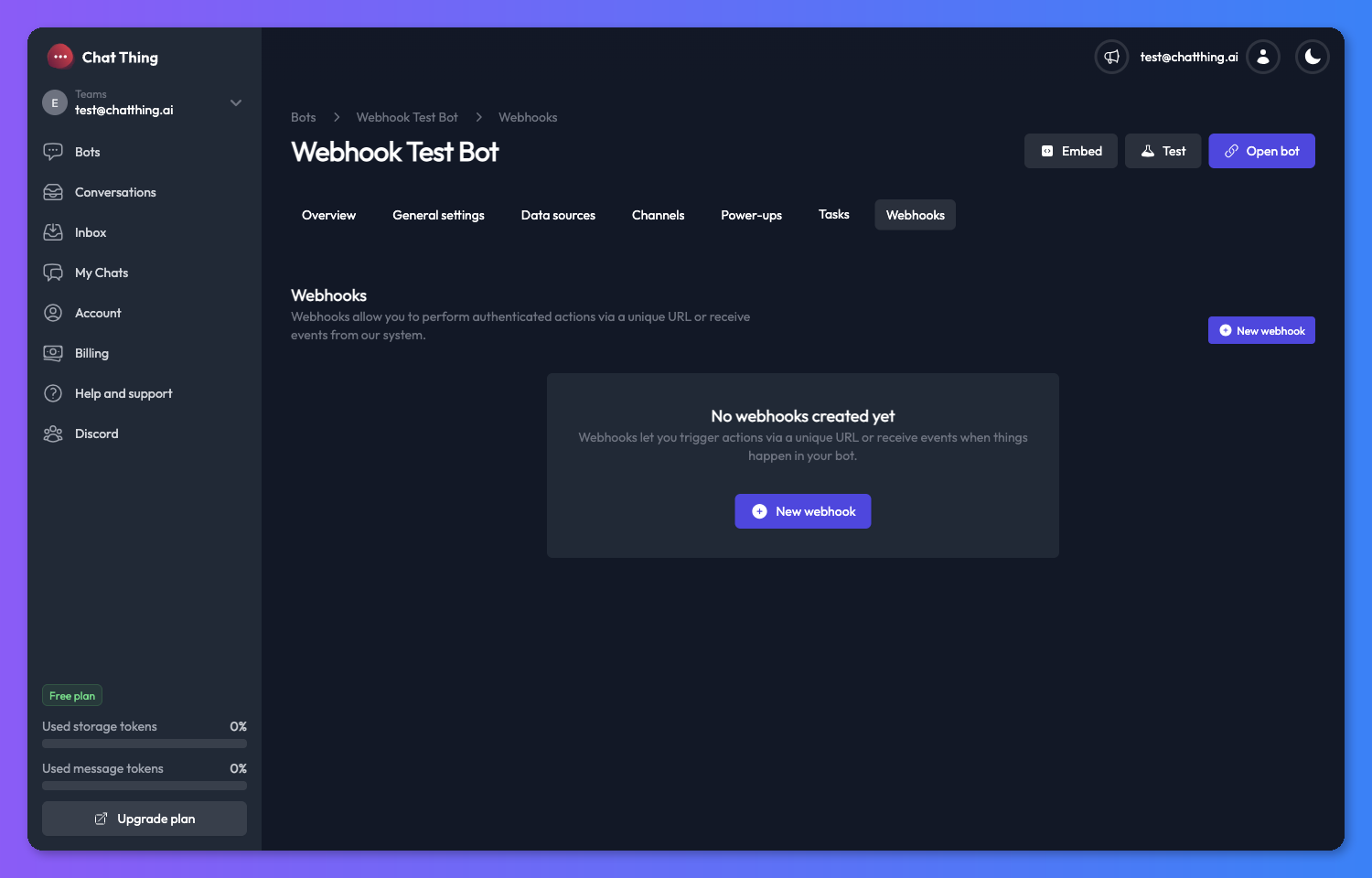
- Open a bot and click the Webhooks tab.
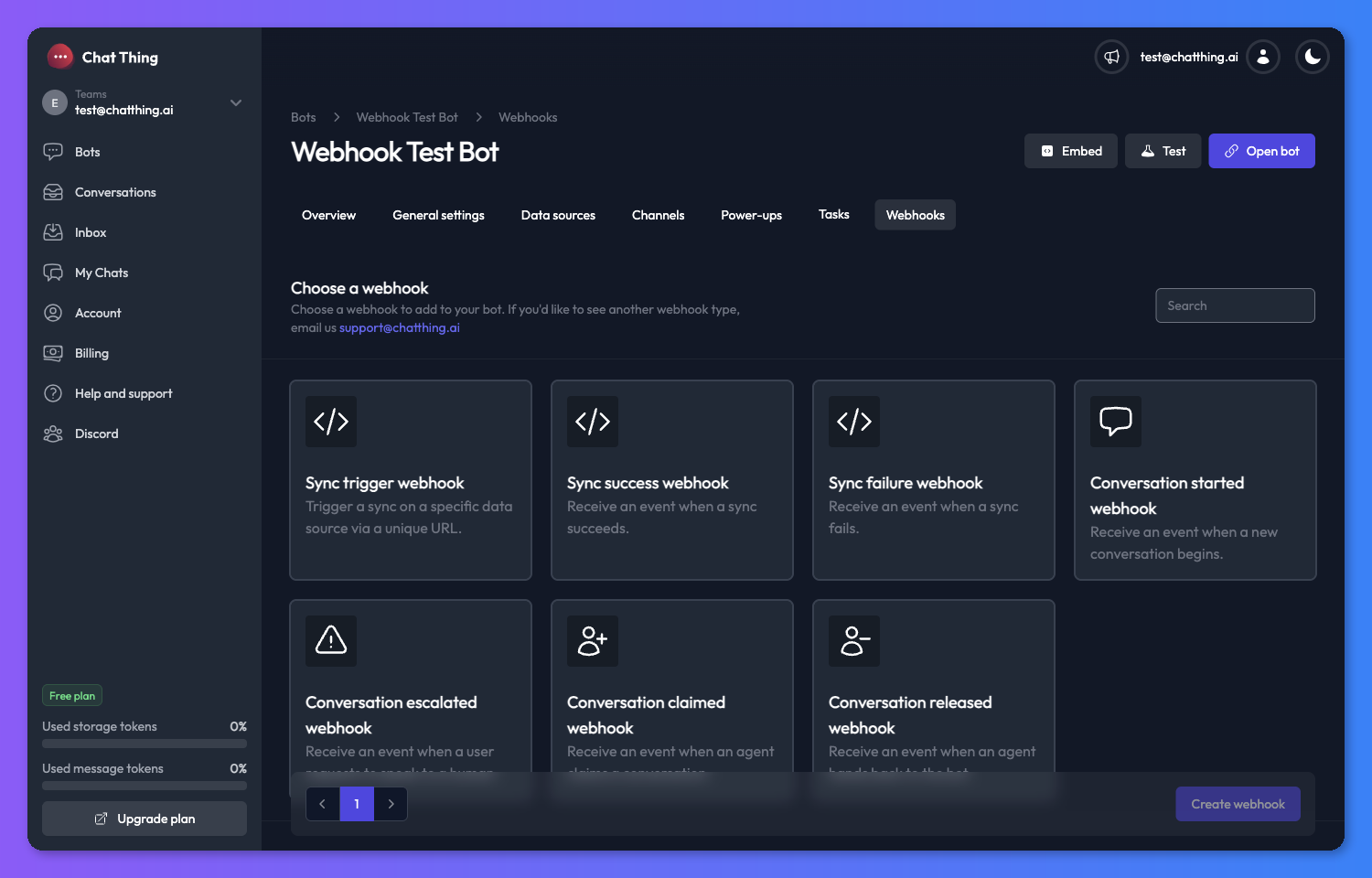
- Click New webhook to open the webhook catalog.
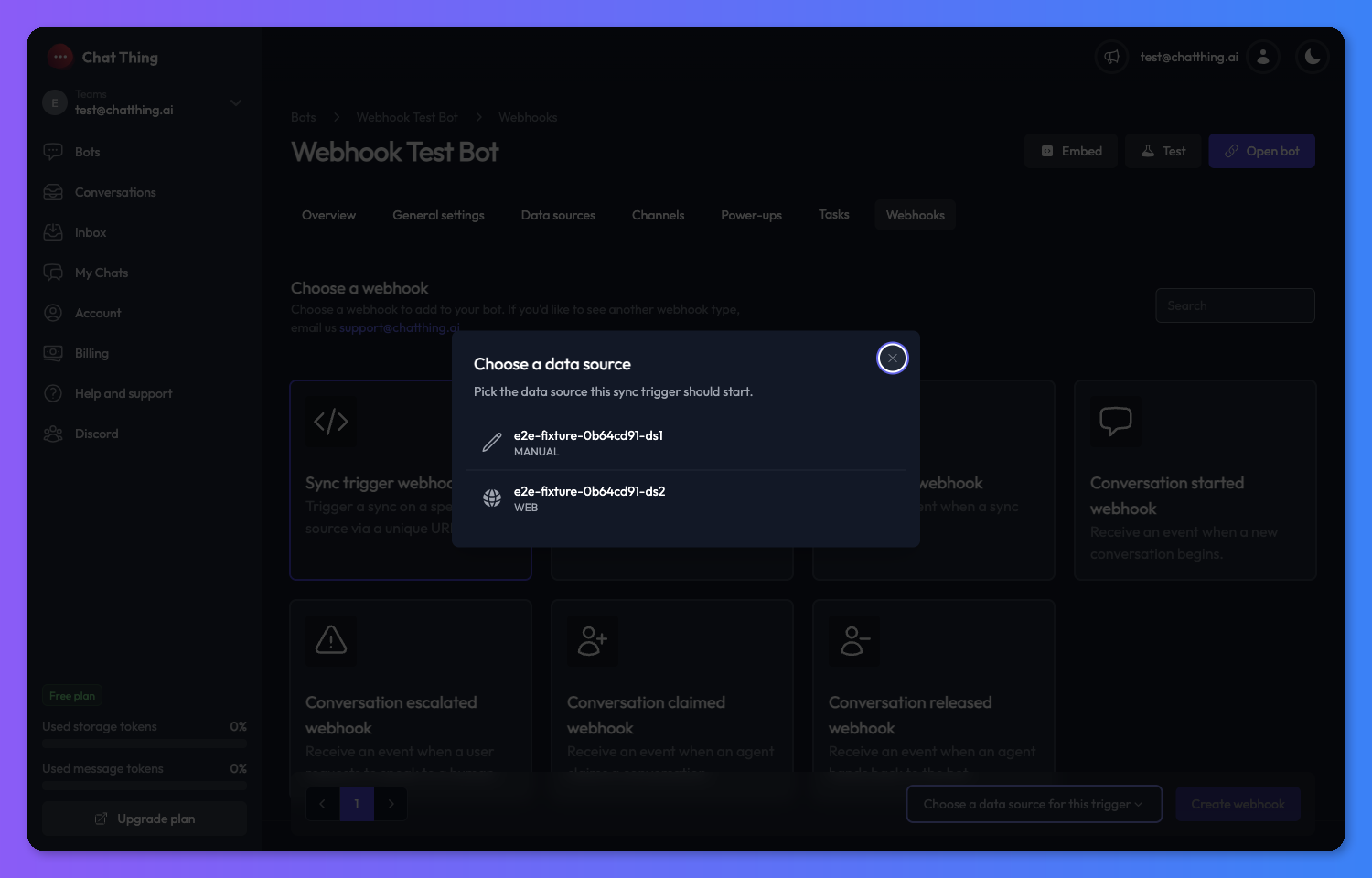
- Search for, or pick, the webhook type you want. If you pick the Sync trigger webhook, an inline Data source picker appears so you can choose which source the hook will sync.
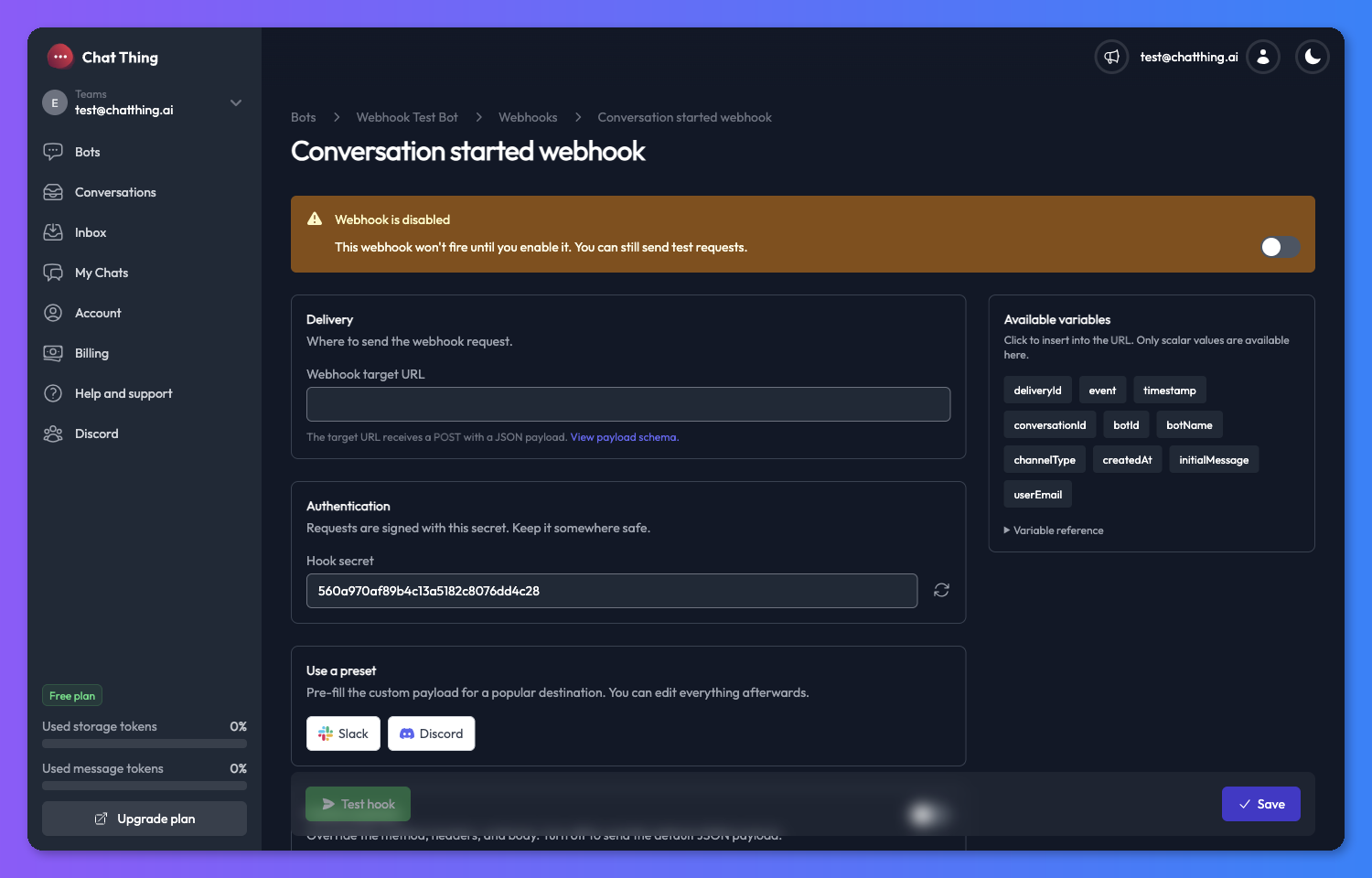
- Click Create webhook. You'll land on the webhook's settings page with the hook pre-seeded and disabled.
- Fill in the required fields and click Save.
- Flip the Enabled toggle to start receiving or accepting traffic.
Managing your webhooks
Once a webhook exists you can manage it from two places - its card on the Webhooks tab, and its own settings page.
Enabling and disabling
Every webhook has an Enabled toggle, available both on the card and on the settings page header. Disabled webhooks behave differently depending on direction:
- For an outgoing webhook, disabled means ChatThing will not send any live events to your target URL. The Test hook button still works, so you can validate the configuration before going live.
- For an incoming webhook, disabled means requests to the webhook URL will be rejected rather than triggering a sync.
Opening settings
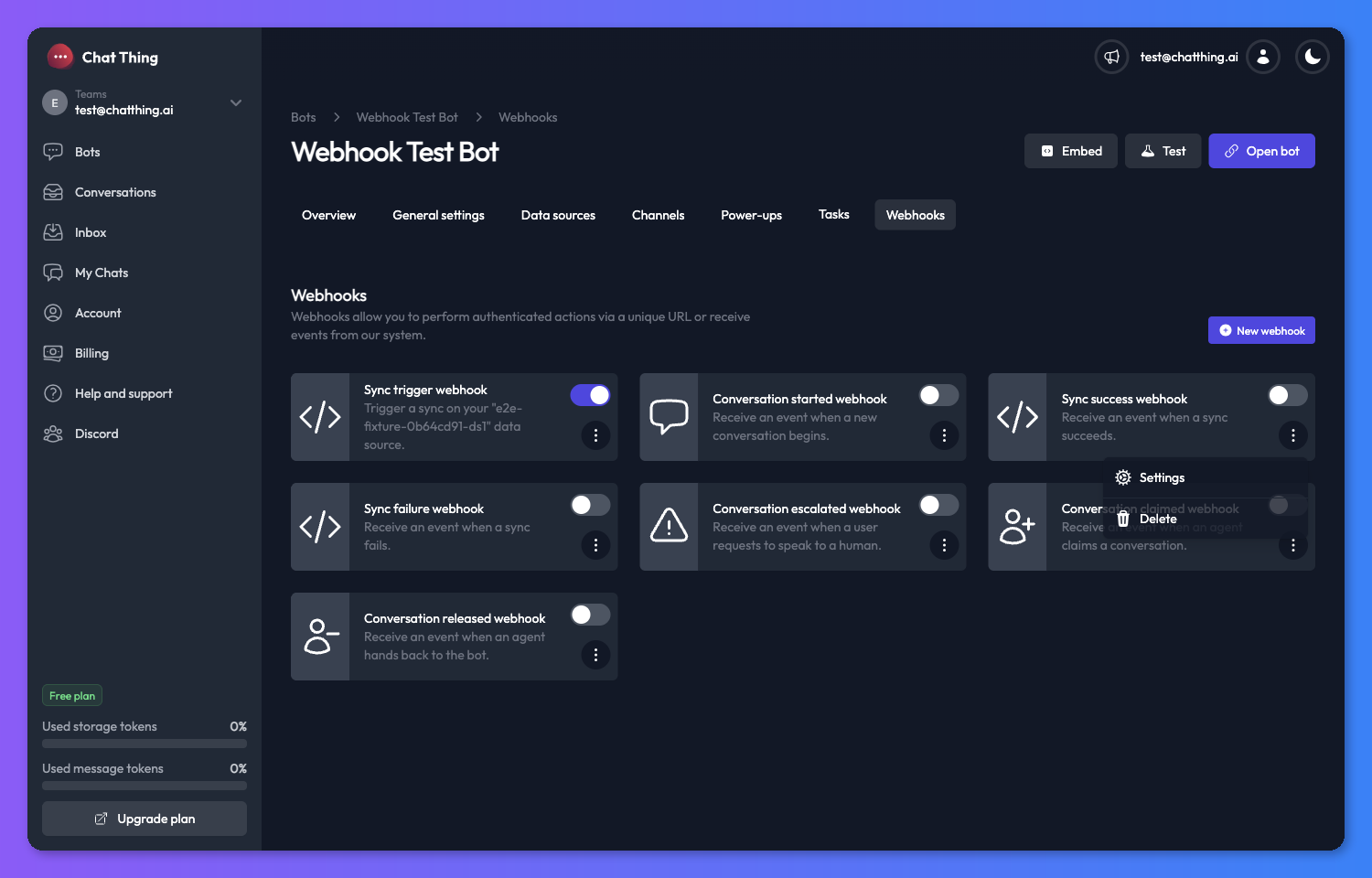
On any webhook card, click the kebab (⋮) menu and select Settings to open that webhook's settings page.
Deleting a webhook
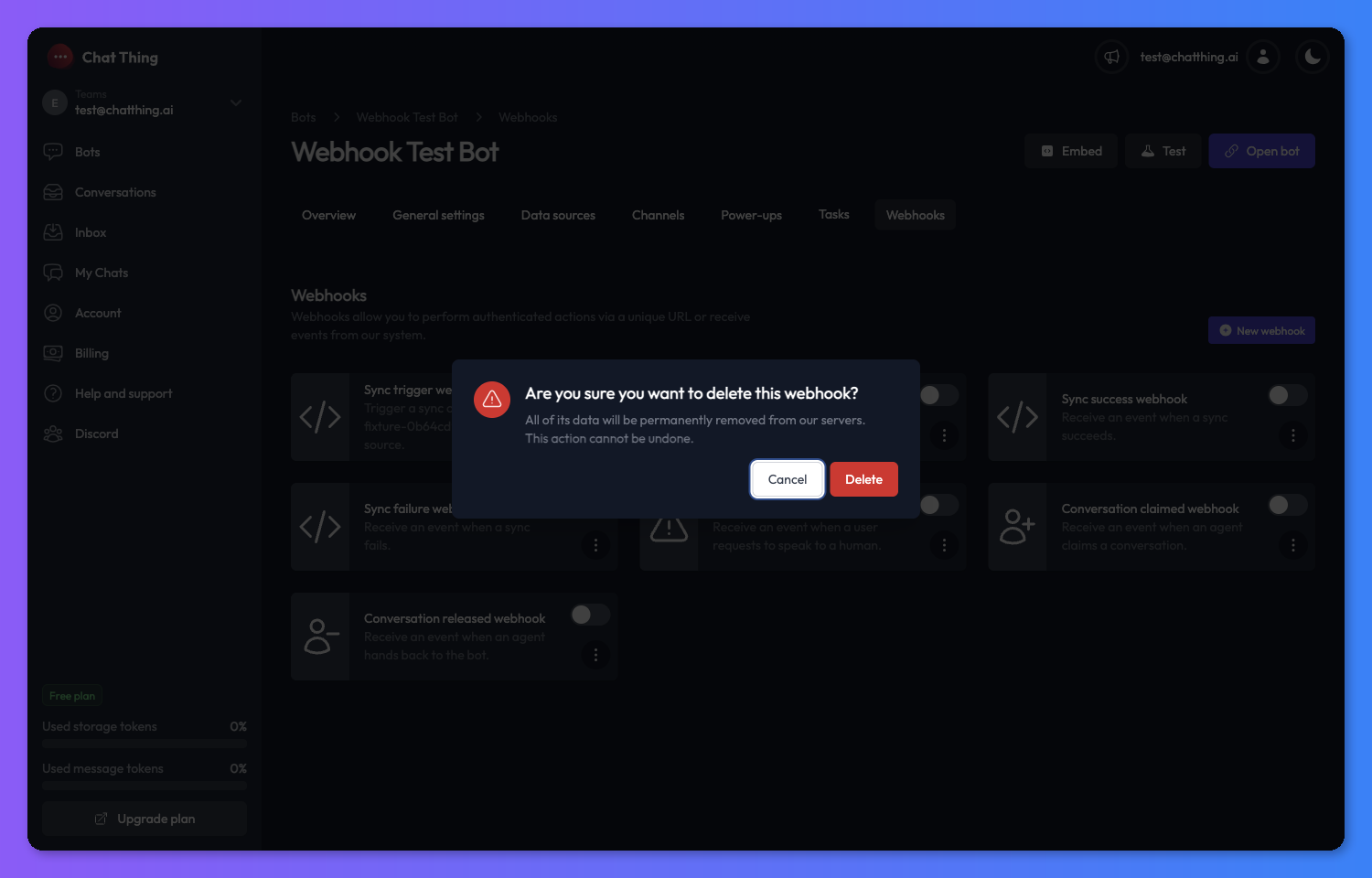
Open the kebab menu on the card and choose Delete. A confirmation modal appears - confirming it removes the webhook permanently and invalidates any incoming URL it was using.
Testing a webhook
The settings page has a Test hook button in the action bar.
- For outgoing webhooks, it sends a real request to the saved target URL using your saved headers and body. It runs against the saved configuration, so save any changes you want to test first. It fires even when the hook is disabled.
- For the Sync trigger webhook, the test button is labelled Open webhook URL and simply opens the unique webhook URL in a new tab so you can see the request flow end-to-end.
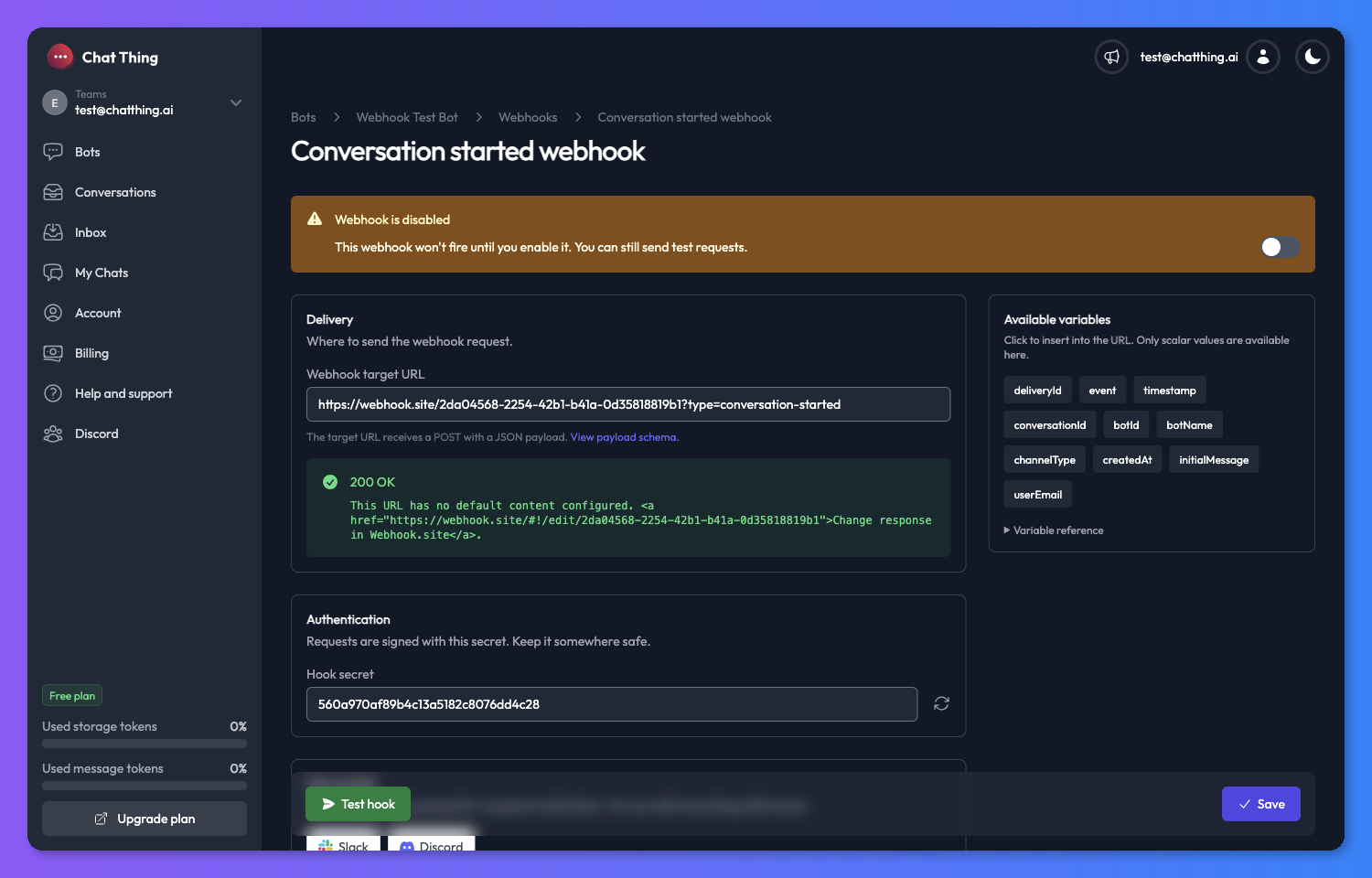
The response from an outgoing test is rendered at the top of the settings page, including the HTTP status and body.
Configuring an outgoing webhook
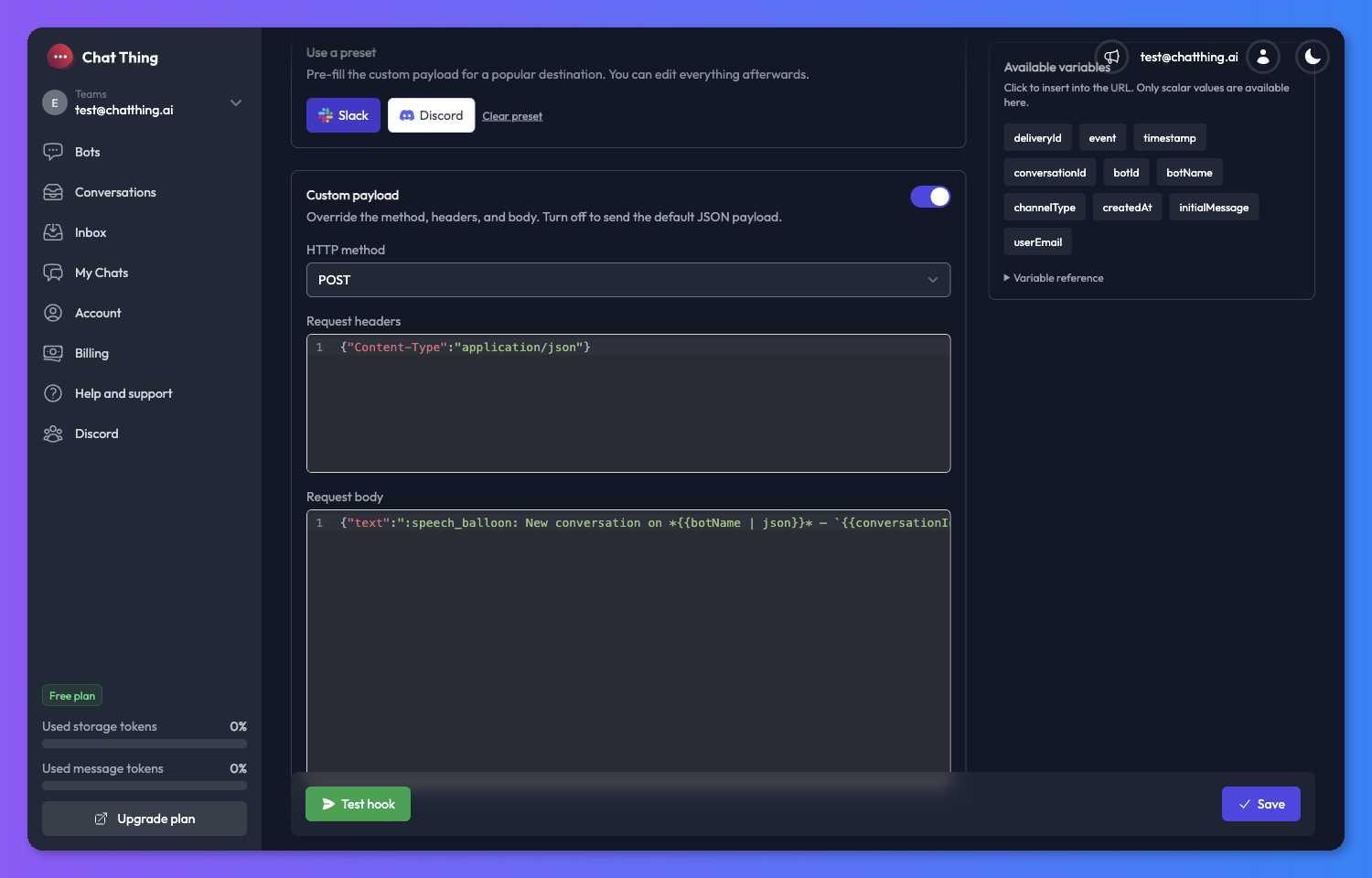
Outgoing webhook settings are split into three sections: Delivery, Authentication, and Custom payload, with a Variables sidebar on the right.
Delivery
Set the URL we should send requests to.
- Webhook target URL - the full URL, including
https://. ChatThing will send aPOSThere when the event fires (or your chosen method, if you've turned on custom payloads). - Data source (sync success / sync failure only) - optional. Leave empty to fire for any data source on the bot, or pick one to scope the hook to a specific source.
Authentication
Every outgoing webhook needs a secret. We use it to sign the request so your server can confirm the payload actually came from us (see Security).
- Click the regenerate icon next to the secret field to get a fresh value.
- Rotating the secret invalidates the signatures on any in-flight deliveries - receivers checking signatures will start rejecting old requests until they pick up the new secret.
Custom payload
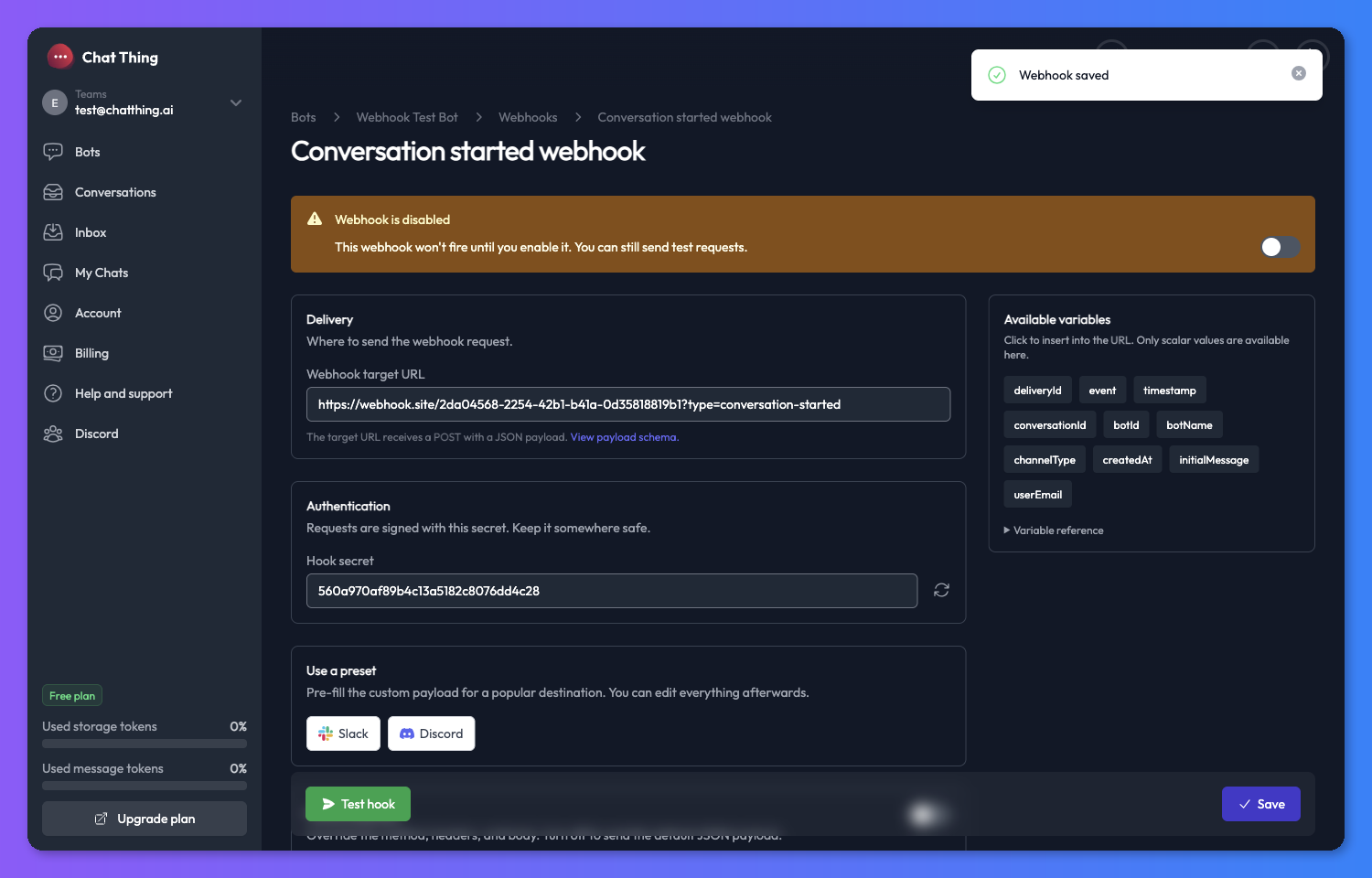
By default, each outgoing webhook sends a fixed JSON payload (documented in Available webhook types below) with a POST. Turn on Custom payload if you want to override any of that:
- HTTP method - choose
POST,PUT,PATCH,GET, orDELETE. - Request headers - JSON object of headers to send.
- Request body - the exact string we'll send as the body.
Turning the toggle off hides the override but keeps the fields visible (they're just not saved). The default payload resumes.
You can template the target URL, headers, and body with {{dot.path}} placeholders that resolve against the event payload. For example, on a Conversation started webhook, a body of:
{ "bot": "{{conversation.botName}}", "message": "{{conversation.initialMessage}}" }
…will be rendered with real values at delivery time.
Scalar-only in URLs and headers. The target URL and header values can only contain text, numbers, or booleans. Pick a specific field like {{conversation.id}}, not a whole object like {{conversation}}. The body accepts both - objects and arrays are JSON-encoded.
If a placeholder doesn't resolve (for example, a typo like {{conversation.userData.emial}}), the literal {{...}} token is sent to your receiver. The Test hook button flags unresolved tokens before you go live.
Variables sidebar
The right-hand sidebar lists the variables available for the webhook type you're configuring. Click a variable chip to insert its {{dot.path}} into whichever field you last clicked.
- The palette filters based on context: when you're editing the target URL or headers, only scalar variables are shown (text / numbers / booleans). When you're editing the body, every variable is available, and non-scalars are marked with an object badge.
- Expand Variable reference at the bottom of the sidebar for a full list with descriptions - a handy source of truth for what each event carries.
Configuring the sync trigger webhook
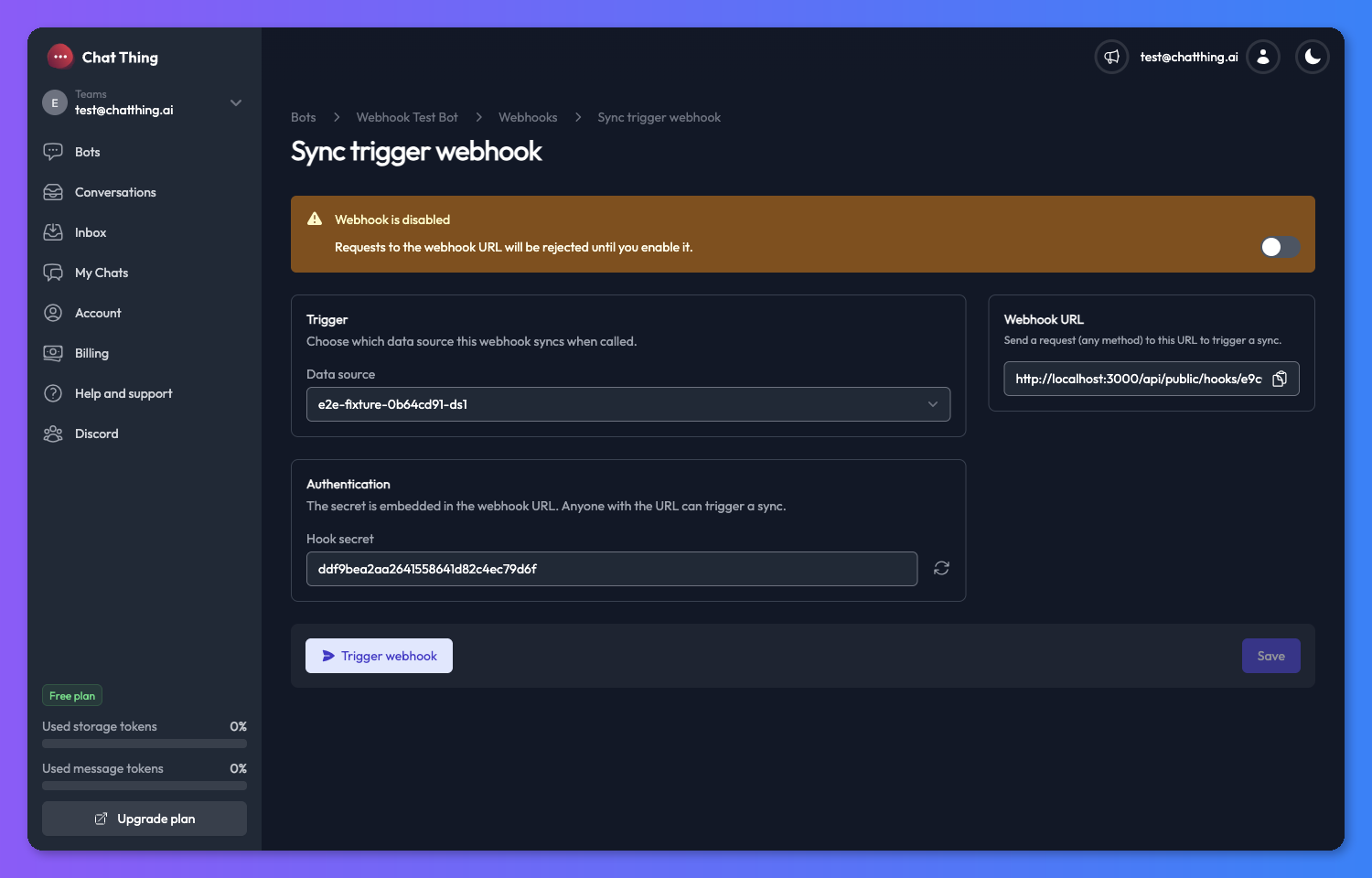
The Sync trigger webhook is the only incoming type, so its settings page is smaller.
Trigger
Pick the Data source you want this URL to sync when it's called.
Authentication
The secret is part of the webhook URL - there's no separate header to send. Regenerating the secret changes the URL and invalidates the previous one.
Webhook URL panel
The sidebar shows the full, ready-to-share URL in the form:
https://chatthing.ai/api/public/hooks/<hookId>/<secret>
Treat this URL like a password. Anyone with it can trigger a sync against your data source. If it leaks, regenerate the secret to invalidate it.
How to call it
Any HTTP method works - GET, POST, or anything else your upstream system sends is fine.
curl --request GET \
  --url https://chatthing.ai/api/public/hooks/38362dae-a2b4-4484-8ced-920082a40b45/14e6c7131ce0465cb46ec109e7de0719
fetch(
  "https://chatthing.ai/api/public/hooks/38362dae-a2b4-4484-8ced-920082a40b45/14e6c7131ce0465cb46ec109e7de0719",
  { method: "GET" }
)
  .then((response) => response.json())
  .then((response) => console.log(response))
  .catch((err) => console.error(err));
import requests

url = "https://chatthing.ai/api/public/hooks/38362dae-a2b4-4484-8ced-920082a40b45/14e6c7131ce0465cb46ec109e7de0719"

response = requests.request("GET", url)

print(response.text)
A successful call returns:
{
  "success": true
}
Available webhook types
One reference per webhook type, in catalog order. Every outgoing payload also carries the delivery headers documented in Security.
Every outgoing payload body includes a top-level deliveryId (string) - the same UUID that is echoed in the X-ChatThing-Delivery-Id header. It is stable across retries, so receivers can de-dupe on it without having to read headers.
Sync trigger webhook
Fires when an external system calls the unique URL generated for this hook. Triggers a sync on the configured data source.
Response body
- success (boolean): whether the sync was successfully queued.
Example response:
{
  "success": true
}
Sync success webhook
Fires when a data source on the bot finishes syncing successfully. If you pick a data source on the hook, it only fires for that source; otherwise it fires for every source on the bot.
Payload
- success (boolean): always
truefor this event. - results (object):
- totalTokens (number): the total number of storage tokens consumed by this sync.
- modifiedRows (number): the number of rows which have changed since the last sync.
- totalDocuments (number): the total number of individual documents relating to this data source.
- unmodifiedRows (number): the number of rows which haven't changed since the last sync.
- totalDataSourceRows (number): the number of data source rows.
- bot (string): the name of the bot.
- dataSource (string): the name of the data source.
Example body:
{
  "success": true,
  "deliveryId": "d3c5a9e8-1b2c-4f5a-9b8d-1a2b3c4d5e6f",
  "results": {
    "totalTokens": 241245,
    "modifiedRows": 15,
    "totalDocuments": 20,
    "unmodifiedRows": 0,
    "totalDataSourceRows": 15
  },
  "bot": "Testing bot",
  "dataSource": "Data source one"
}
Sync failure webhook
Fires when a data source on the bot fails to sync. Same scoping rules as sync success - pick a data source to scope, or leave empty for any source on the bot.
Payload
- success (boolean): always
falsefor this event. - reason (string): why the sync failed.
- bot (string): the name of the bot.
- dataSource (string): the name of the data source.
Example body:
{
  "success": false,
  "deliveryId": "d3c5a9e8-1b2c-4f5a-9b8d-1a2b3c4d5e6f",
  "reason": "Over plan storage token limit, please upgrade plan",
  "bot": "Testing bot",
  "dataSource": "Data source one"
}
Conversation webhooks
The remaining four webhook types fire during the conversation lifecycle. They are useful for integrating with CRMs, ticketing systems, and monitoring tools. To learn more about the lifecycle itself, see Human takeover.
Conversation started webhook
Fires when a new conversation is created with your bot.
Payload
- event (string):
"conversation.started". - timestamp (string): ISO 8601 timestamp.
- conversation (object):
- id (string): the conversation ID.
- botId (string): the bot ID.
- botName (string): the name of the bot.
- initialMessage (string) (optional).
- channelType (string): the channel type (e.g.
"web","slack"). - createdAt (string): ISO 8601 timestamp of when the conversation was created.
Example body:
{
  "event": "conversation.started",
  "deliveryId": "d3c5a9e8-1b2c-4f5a-9b8d-1a2b3c4d5e6f",
  "timestamp": "2026-03-10T12:00:00.000Z",
  "conversation": {
    "id": "abc-123",
    "botId": "def-456",
    "botName": "My Bot",
    "channelType": "web",
    "initialMessage": "What are your opening times?",
    "createdAt": "2026-03-10T12:00:00.000Z"
  }
}
Conversation escalated webhook
Fires when a user requests to speak to a human agent (via the "Talk to a human" function). Fires for all channels, regardless of whether our team-inbox takeover UI is enabled for the bot.
Payload
- event (string):
"conversation.escalated". - timestamp (string): ISO 8601 timestamp.
- conversation (object):
- id (string): the conversation ID.
- botId (string): the bot ID.
- botName (string): the name of the bot.
- channelType (string): the channel type.
- state (string):
"Escalated". - userData (object): any user data collected during the conversation.
- userEmail (string): the email address provided by the user.
Example body:
{
  "event": "conversation.escalated",
  "deliveryId": "d3c5a9e8-1b2c-4f5a-9b8d-1a2b3c4d5e6f",
  "timestamp": "2026-03-10T12:05:00.000Z",
  "conversation": {
    "id": "abc-123",
    "botId": "def-456",
    "botName": "My Bot",
    "channelType": "web",
    "state": "Escalated",
    "userData": {}
  },
  "userEmail": "[email protected]"
}
Conversation claimed webhook
Fires when an agent claims (takes over) a conversation.
Payload
- event (string):
"conversation.claimed". - timestamp (string): ISO 8601 timestamp.
- conversation (object):
- id (string): the conversation ID.
- botId (string): the bot ID.
- botName (string): the name of the bot.
- channelType (string): the channel type.
- state (string):
"Active".
- agent (object):
- name (string): the agent's display name.
- email (string): the agent's email address.
Example body:
{
  "event": "conversation.claimed",
  "deliveryId": "d3c5a9e8-1b2c-4f5a-9b8d-1a2b3c4d5e6f",
  "timestamp": "2026-03-10T12:10:00.000Z",
  "conversation": {
    "id": "abc-123",
    "botId": "def-456",
    "botName": "My Bot",
    "channelType": "web",
    "state": "Active"
  },
  "agent": {
    "name": "Jane",
    "email": "[email protected]"
  }
}
Conversation released webhook
Fires when an agent hands a conversation back to the bot.
Payload
- event (string):
"conversation.released". - timestamp (string): ISO 8601 timestamp.
- conversation (object):
- id (string): the conversation ID.
- botId (string): the bot ID.
- botName (string): the name of the bot.
- channelType (string): the channel type.
- state (string):
"Resolved".
- agent (object):
- name (string): the agent's display name.
- email (string): the agent's email address.
Example body:
{
  "event": "conversation.released",
  "deliveryId": "d3c5a9e8-1b2c-4f5a-9b8d-1a2b3c4d5e6f",
  "timestamp": "2026-03-10T12:15:00.000Z",
  "conversation": {
    "id": "abc-123",
    "botId": "def-456",
    "botName": "My Bot",
    "channelType": "web",
    "state": "Resolved"
  },
  "agent": {
    "name": "Jane",
    "email": "[email protected]"
  }
}
Security
Every outgoing webhook is signed with your secret. Verifying the signature proves the request came from ChatThing and wasn't tampered with in transit. If you don't plan to verify (for example, you're just hitting webhook.site to check it's working), you can skip this section.
Request headers
Every outgoing webhook carries these headers:
| Header | Description |
|---|---|
X-Secret-Key | The hook secret you configured. Retained for backwards compatibility. |
X-ChatThing-Signature | sha256=<hex> - HMAC-SHA256 of the exact bytes in the request body, keyed by your secret. |
X-ChatThing-Delivery-Id | A stable UUID that is the same across all retries of a given delivery. Use it to dedupe on your side. |
X-ChatThing-Event | The event name, e.g. conversation.started, conversation.escalated, sync.success. |
X-ChatThing-Test | Sent as true when you click Test hook in the setup UI. Absent on real events. Safe to ignore in prod. |
Verifying the signature
Compute an HMAC-SHA256 of the exact bytes in the request body using your hook secret, hex-encode it, and prefix it with sha256=. Compare that to the X-ChatThing-Signature header using a constant-time comparison.
import crypto from "node:crypto";

function verifyChatThingSignature(rawBody, headerValue, secret) {
  const expected =
    "sha256=" +
    crypto.createHmac("sha256", secret).update(rawBody, "utf8").digest("hex");
  const a = Buffer.from(expected);
  const b = Buffer.from(headerValue ?? "");
  return a.length === b.length && crypto.timingSafeEqual(a, b);
}
import hmac
import hashlib

def verify_chatthing_signature(raw_body: bytes, header_value: str, secret: str) -> bool:
    expected = "sha256=" + hmac.new(
        secret.encode("utf-8"), raw_body, hashlib.sha256
    ).hexdigest()
    return hmac.compare_digest(expected, header_value or "")
Verify against the raw request body - parsing the body to JSON and re-serialising will change the bytes and invalidate the signature.
Retries and timeouts
If your receiver is briefly unavailable, ChatThing retries delivery automatically:
- Up to 5 attempts with exponential backoff (~30s → 1m → 2m → 4m → 8m).
- A retry reuses the same
X-ChatThing-Delivery-Id, so receivers that dedupe on the id will not double-process an event. - Requests time out after 10 seconds. A non-responsive receiver does not pin a worker.
Responses with a 3xx status are not followed - configure your webhook to point at the final URL directly.
Troubleshooting & tips
My webhook isn't firing. Double-check the Enabled toggle on the webhook card or settings page. Disabled outgoing webhooks won't send live events (but the Test hook button still works).
My receiver is getting {{conversation.id}} literally. That means the placeholder didn't resolve at delivery time - usually a typo in the path. Pick variables from the sidebar rather than typing them, and watch the Test hook result for the "unresolved template tokens" warning.
I just want to smoke-test a webhook. webhook.site is a free receiver that gives you a one-off URL and shows every request it receives. Point an outgoing webhook at it, hit Test hook, and you'll see exactly what your server would get.
Need something else?
We're always looking to improve ChatThing, so if you need a webhook which isn't described above please email us: [email protected]